需要進行拖移的模型其[原點]最好設置在[幾何中心]
因為拖移出現異常,我為了解決這個問題,認真看 DragControls 的原始碼,所有處理拖移的邏輯都相當周全,基本上不應該出現異常現象。
在用 console.log 查看拖移的座標數值時,才發現原來是模型的[原點]設置在[場景中心]造成的。
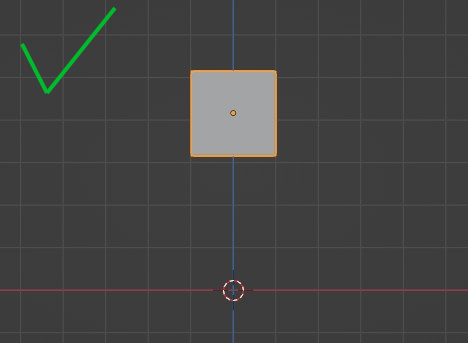

需要進行拖移的模型其[原點]最好設置在[幾何中心]
因為拖移出現異常,我為了解決這個問題,認真看 DragControls 的原始碼,所有處理拖移的邏輯都相當周全,基本上不應該出現異常現象。
在用 console.log 查看拖移的座標數值時,才發現原來是模型的[原點]設置在[場景中心]造成的。
/* 解壓縮 lib 載入器
 * https://threejs.org/docs/#examples/en/loaders/DRACOLoader
 * https://google.github.io/draco/
 */
const dracoLoader = new THREE.DRACOLoader();

/* 指定解壓器的位置 */
dracoLoader.setDecoderPath('../Scripts/three.145/libs/draco/');


/* GLTF 載入器 */
const gltfLoader = new THREE.GLTFLoader();
gltfLoader.setDRACOLoader(dracoLoader);

/* 載入模型 */
gltfLoader.load('Model.glb', function (gltf) {
    const model = gltf.scene;
    scene.add(model);
});
剛開始接觸 ThreeJS 時,被材質發黑這個問題,困擾很久,一直沒找到問題點,不管怎麼增加 HemisphereLight 都無效,用了四個方向 DirectionalLight 才呈現能接受的效果。
後來才發現問題點是金屬屬性 (metalness),因為金屬有鏡面效果會映像出周圍的景象,然後我又沒有設置 environment map,整個場景 (scene) 都是黑漆漆的,所以材質映像出來也會是黑色的。


import os
import logging
import logging.handlers

from flask import Flask, g, request, json

app = Flask(__name__)


#[ Log 配置 ]#############################################################
 # 用來記錄無法處理的錯誤 (PS: 使用 WSGI 會依附 Apache 的設定,可以不用配置)

# https://docs.python.org/zh-cn/3/library/logging.html
formatter = logging.Formatter("%(asctime)s [%(levelname)s]  %(message)s")

# https://docs.python.org/zh-tw/3/library/logging.handlers.html#timedrotatingfilehandler
handler = logging.handlers.TimedRotatingFileHandler("log/web-api",
    when = "D",
    interval = 1,
    backupCount = 7,
    encoding = "UTF-8",
    delay = False,
    utc = True)
handler.setFormatter(formatter)

app.logger.addHandler(handler)
import os
import datetime
import time

from flask import Flask, g, request, json
from flask.json import JSONEncoder


class CustomJsonEncoder(JSONEncoder):
    # 針對日期自訂 Json 轉換

    def default(self, obj):
        if isinstance(obj, datetime.date):
            return obj.isoformat().replace('T', ' ')

        return super().default(obj)


app = Flask(__name__)

app.json_encoder = CustomJsonEncoder
app.config['JSON_AS_ASCII'] = False  # 返回結果可以正確顯示中文
import os
import mysql.connector as sql

from werkzeug.exceptions import HTTPException, BadRequest
from flask import Flask, g, request, json


app = Flask(__name__)


#[ DB 處裡 ]#############################################################

# https://docsxyz.com/zh-hant/wiki/python/connector-python-connectargs
db_config = {
    'host'      : "localhost",
    'user'      : "XXXX",
    'passwd'    : "XXXX",
    'db'        : 'XXXX',
    'use_pure'  : True,
    'autocommit': True,
    'charset'   : 'utf8',
}


@app.before_request
def before_request():
    # 在 request 前開啟 DB 連線
    # g 是 Flask global 在每個 request 有獨立的 context

    g.cnt = sql.connect(**db_config)
    g.cursor = g.cnt.cursor(dictionary = True)


@app.after_request
def after_request(response):
    # 在 request 後結束 DB 連線

    cursor = g.get('cursor', None)
    if cursor is not None:
        # 當 cursor 還有 row 沒有取出,close 會發生錯誤
        if cursor.with_rows : cursor.fetchall()
        cursor.close()

    cnt = g.get('cnt', None)
    if cnt is not None:
        cnt.close()

    return response
from werkzeug.exceptions import HTTPException, BadRequest
from flask import Flask, g, request, json

app = Flask(__name__)


#[ 錯誤處裡 ]#############################################################
@app.errorhandler(Exception)
def handle_exception(e):
    if isinstance(e, HTTPException): return e  # 讓 HTTPException 交由下一個處理

    app.logger.exception("Internal Server Error.")  # log 錯誤訊息
    if app.debug : return e

    return json.jsonify({'message': 'Internal Server Error.'}), 500


@app.errorhandler(HTTPException)
def handle_exception(e):
    response = e.get_response()
    return json.jsonify({'message': e.description}), e.code